One terminal.
Every target.
PingXT is a fast, cross-platform network utility for checking multiple hosts, address ranges, CIDR networks, and saved target lists concurrently—with a live Watch Mode when you need to keep eyes on critical endpoints.
Reachability without the window juggling.
PingXT takes the simple workflow of ping and makes it practical for the way network professionals actually work.
Multi-target
Check multiple IPv4 addresses and hostnames in a single command instead of opening separate terminals.
CIDR & ranges
Expand IPv4 CIDR networks or test exactly the address range you care about.
Target files
Maintain repeatable lists for maintenance windows, labs, remote sites, or critical infrastructure.
Concurrent workers
Control how many targets PingXT tests simultaneously with a configurable worker pool.
Watch Mode
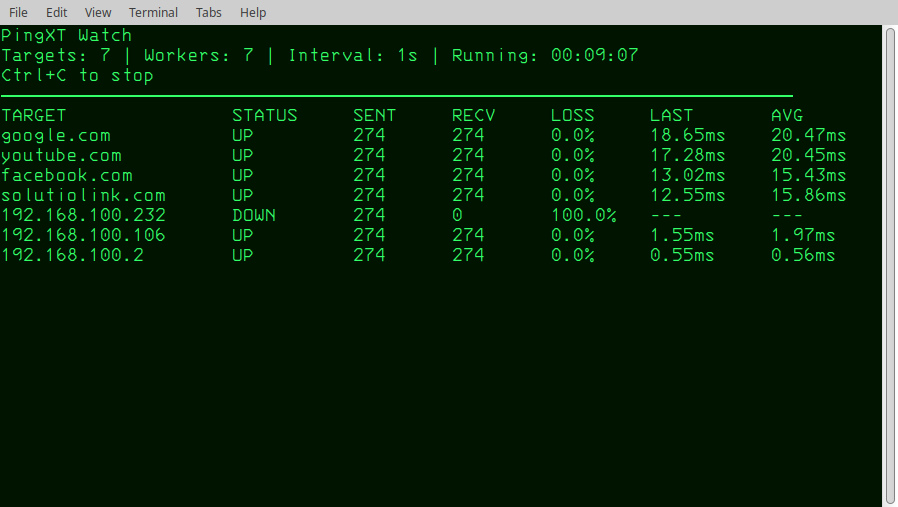
Continuously track current UP/DOWN state, packet loss, latest RTT, and cumulative average latency.
Cross-platform
Built for Windows, Linux, and macOS, with successful testing under WSL as well.
From quick checks to live monitoring.
Use normal mode for breadth. Use Watch Mode when you need a focused, live view of the endpoints that matter.
Normal Mode
Check several hosts, a subnet, an address range, or a saved target list.
pingxt 192.168.1.0/24
pingxt 192.168.1.10-192.168.1.50
pingxt -f targets.txt
Watch Mode
Keep a curated set of important endpoints visible during changes or troubleshooting.
pingxt -watch -workers 64 -t 500ms -f lan.txt
Normal → Live Watch → Session Summary.
Actual PingXT output from a real test session—no manufactured terminal data. Click any screenshot to enlarge it.
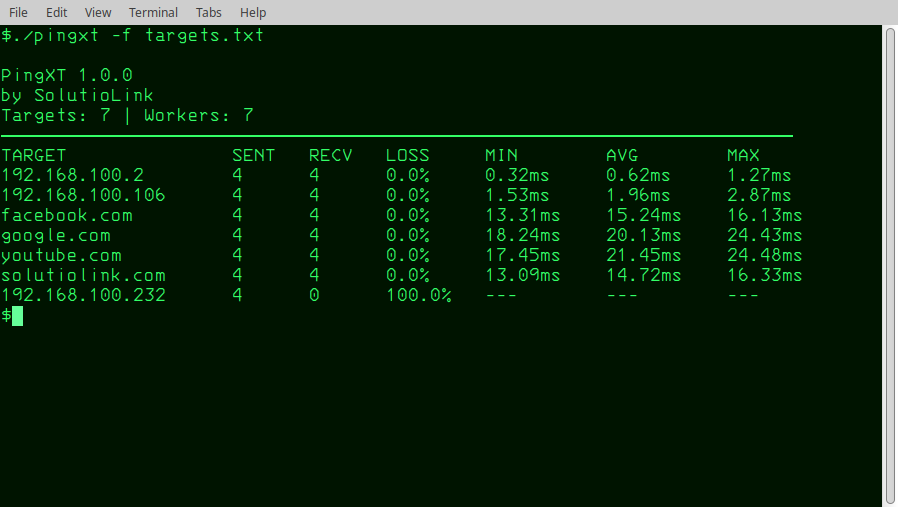
Normal Mode
Run a focused check across individual hosts, lists, ranges, or CIDR networks.
Live Watch
Keep critical targets visible with current status, packet loss, last RTT, and average latency.
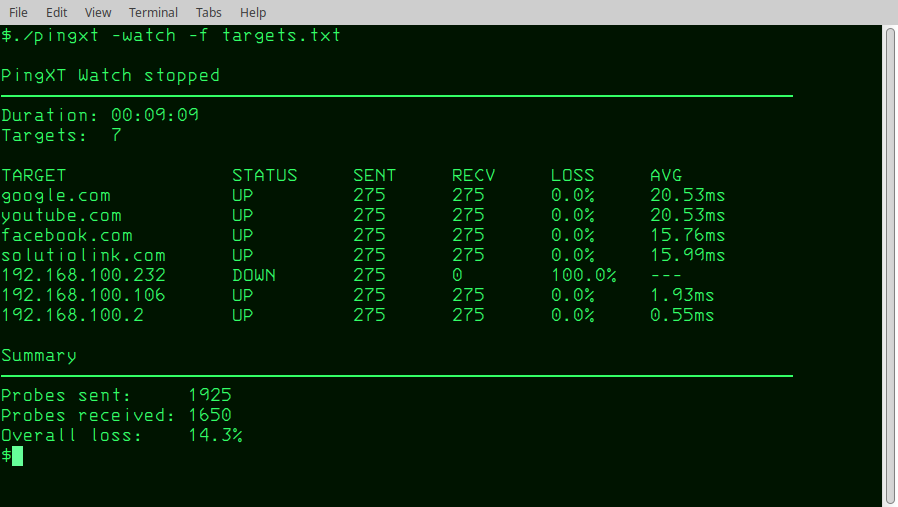
Session Summary
Stop cleanly with Ctrl+C and keep final per-target statistics plus overall probe loss.
One user. One license.
Buy the tool once. Use the supported PingXT build on the systems you control.
One-time purchase. No subscription.
Coming SoonCommercial launch pending final legal review and release packaging.
- Windows, Linux, and macOS builds included
- Professional and commercial use for the licensed user
- PingXT 1.x updates included
- No recurring software subscription
The license follows the user.
A PingXT license is planned for one individual user, not one computer. A licensed network professional can use the appropriate PingXT build across the systems they personally control.
Organizations with multiple users will need one license per user. Volume options can be offered separately.
Quick answers.
Is PingXT a network scanner?
PingXT is a focused ICMP reachability utility. It can test CIDR networks and ranges, but it is not a vulnerability scanner, asset-management platform, or full Network Monitoring System.
What is Watch Mode for?
Watch Mode is best for a curated set of important devices—routers, switches, gateways, servers, WAN endpoints, or lab nodes—during maintenance and troubleshooting.
Why can a reachable device show DOWN?
PingXT measures ICMP reachability. Firewalls, ACLs, routing conditions, filtering, rate limiting, host configuration, or an aggressive timeout can prevent an Echo Reply even when the device provides other services.
Does one license cover several computers?
The planned PingXT 1.0 license is per user rather than per machine. Final terms will be published with the commercial release after legal review.
Will there be a subscription?
No software subscription is planned for PingXT 1.0. The launch model is a $19.99 one-time purchase with PingXT 1.x updates included.
Which Windows terminal should I use?
Windows Terminal is recommended for the smoothest Watch Mode experience. Classic Command Prompt has more limited terminal rendering behavior.